 SC4D LEX Legacy - dobdriver HD Star Backgrounds
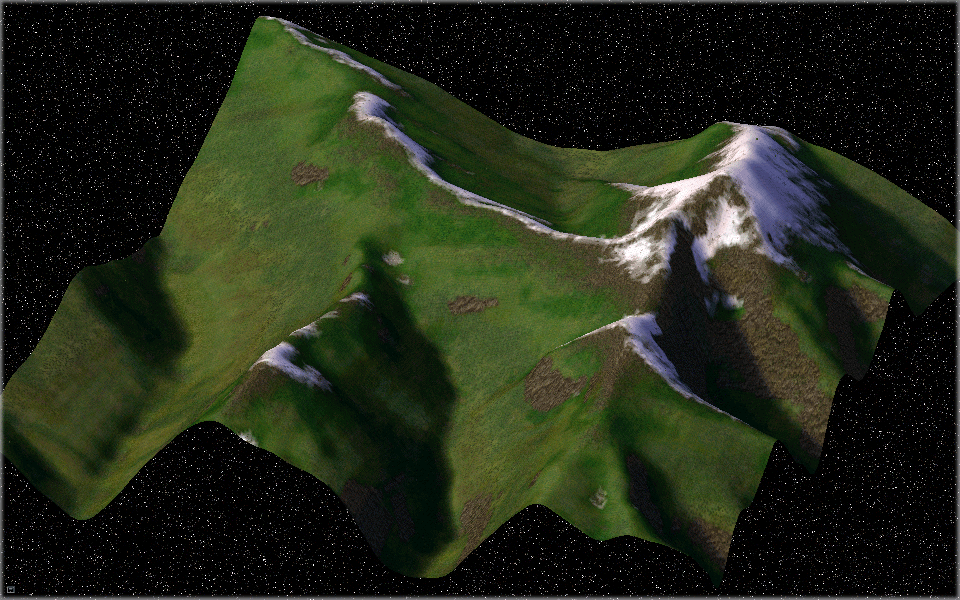
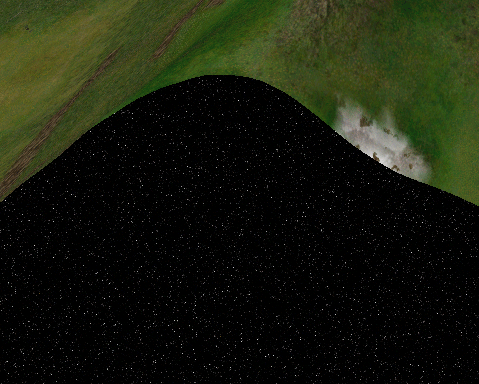
 This package includes dobdriver's HD star background for both the city and region views. This Mod will makeover all the backgrounds and the edges of the city tiles to a HD starscape. This gives a nice effect like flying on a magic carpet through space.
This is an HD mod so hardware rendering is required, otherwise CTDs will occur.
Contents
- dobdriver HD Star Backgrounds (Install_dd_HDStarBackgrounds)
- dobdriver HD Star Backgrounds - Patch Addon 1 (Install_dd_SBM_Patch_Addon_1)
- dobdriver HD Star Backgrounds - Patch Addon 2 (Install_dd_SBM_Patch_Files_Addon_2)
Information
There are four parts to this mod.
- New background textures in region view
- New background textures in city view
- New textures for the city tile edges
- Patch files are for compatibility with terrain mods only
This mod will function correctly once the installation has completed. A patch file is only necessary if one is using a terrain mod. The patch allows this mod and the terrain mod one is using to co-exist in SimCity 4.
What One May Have to Do:
Drag 'n Drop a patch file, only one (1) patch file is to be used at a time corresponding to the terrain mod one is using. This patch must be placed in the folder My DocsSimCity 4Pluginsz____HDStars TerainMod Patch as it has to load after the terrain mod.
The default file for the region view is called RegionViewHD.dat, this can be substituted with RegionViewHDSubdued.dat, found in ~Documents_RegionViewHD Alternative (see readme how to apply it) if it appears too bright.
I have named the main file aHDStarBorders.dat to ensure other mods ie. height plugins that use the same exemplar work as expected, but please ensure to remove these other plugins once the map has been rendered otherwise this mod will no longer work as expected.
I have made patches for Heblem's, Cycledogg's and Mayspacy's terrain mods. I have also made patches for SimMars, Teirusu's Limitless Beach Mod and Thalassicus's Green Beaches mod. No properties in the terrain mods have been altered. If one is using a terrain mod with a modified terrain properties exemplar that I have not included, please post a link in either support thread and I will make a patch to suit.
If one is using any of I like to fish's terrain mods no patch is necessary
Supported 3rd party terrain mods with patch files in this package:
Heblem's terrain mods: Some use the same properties. Each patch can be used for several different terrain mods, these are named accordingly. With Addon 1 there has been added one new patch file for his Californian terrain mod.
Cycledogg's terrain mods: The two Canyonland mods use the same properties so there is only one patch for these, all of the others have different properties and there is a different patch for each.
Mayspacy's terrain mods: All use different properties so there is a separate patch for each. I have not included patches for his superceded mods, but I do have the 4 extra mod patches if anyone needs them.
SimMars: There is only one patch needed for SimMars
Teirusu's terrain mods: Only the LImitless beach mod requires a patch. The Arctic/snow mod and Desert mod do not.
Thalassicus's terrain mods: Only the Green beaches mod requires a patch.
Orange's Terrain Mod:Three patch files cover the seven versions of his Pyrenean terrain Mod. These are split beach, nobeach and fullsnow. - Addon 1
Gobias's Terrain Mod: Two new patch files for his Berner Oberland terrain mod. - Addon 2
Installation
Within the ZIP directly you will find 3 folders and 2 DAT files;
- ~Documents (it contains 4 subfolders)
- _Background Backups - it contains the backup of the original cityview background textures; USE it only if you want to revert to the original MAXIS backgrounds.
- _Patches (see readme how to apply them) - it contains the collection of the 3rd party terrain mod related texture patches. This is a back-up location of all these patches. If you changed the terrain mod you may use these to copy the relevant files for the new terrain mod into the Plugins/z____HDStars TerainMod Patch folder.
- _RegionViewHD Alternative (see readme how to apply it) - it is an alternative texture for the Region View backgrounds.
- dobriver_Readmes - it contains the documentation files (like this readme).
- dobdriver HD Star Background (SC4 INSTALL DIR Plugins)
- you must copy all files from this folder into the Plugins folder of your SimCity 4 INSTALL folder (bear in mind this location can be in various places on your PC, depending on where you installed the game at the first place. When you copy these files into that above suggested folder, it will replace/overwrite existing files in that folder; you must allow this process to happen. - z____HDStars TerainMod Patch
- upon manual installation this folder is empty, it doesn't contain any files, this is its default set-up. This is the folder where you need to copy the 3rd party terrain mod related file(s) from the ~Documents_Patches (see readme how to apply them) folder. The file names are reflecting to the file names of the related Terrain Mod set-up that you might have. You should only use ONE (or the ones) of these files, which are matching with the set-up of your 3rd party terrain mod. Don't use multiple patch files. If you don't use any 3rd party terrain mod, or you use a terrain mod which doesn't have a patch file in this package, this folder should be kept empty. The list of supported terrain mods by patch files are listed above. - aHDStarBorder.dat - this file should be installed (copy/extract) into the root of the Plugins folder (...Documents/Simcity 4/Plugins)
- RegionViewHD.dat - this file should be installed (copy/extract) into the root of the Plugins folder (...Documents/Simcity 4/Plugins)
Suggested method of installation:
- Copy/extract the RegionViewHD.dat and aHDStarBorder.dat files into the root of your Plugins folder.
- Copy/extract the z____HDStars TerainMod Patch folder into your Plugins folder. As a default set-up during manual installation this folder is empty and should be kept empty if you do not have any 3rd party terrain mods or your terrain mod is not listed as supported/patched terrain mod.
- Replace the RegionViewHD.dat file with the RegionViewHDSubdued.dat if you want to use the alternative Region View version.
- Copy the relevant files from the ~Documents_Patches (see readme how to apply them) folder into the z____HDStars TerainMod Patch folder based on the above detailed description if you use 3rd party terrain mods, that have patch files in this package.
If you extracted the ~Documents folder into you plugins too, it's highly recommended to keep it, but move it out of the Plugins folder.
Un-Installing: To un-install the files, simply bulldoze every lot from this download in your cities and delete the files from the plugins folder afterwards.