 BSC Custodian 3ddz and ebina HSRP Subway Converter
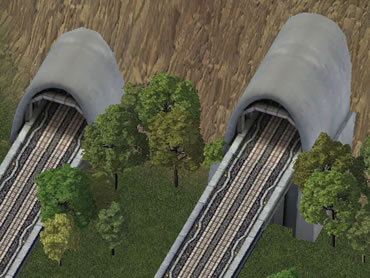
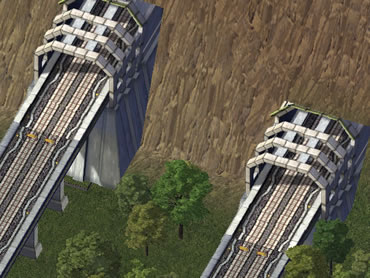
 The first Beta 1 release of the High Speed Rail Project (HSRP) also included two kinds of tunnel models, were implemented as replacement for draggable monorail tunnel. For the puzzle-drag version of HSRP release by the NAM Team, the tunnels have been turned into props and lotted as subway converter in order to provide easy tunnel simulation.
Lot Details & Information
The HSR/GHSR Subway Converters can be found at the bottom of the Rail menu.
Lot size: 1x1 tiles
Menu position: Rail menu (MonoRail Submenu)
Plop cost: § 500
Bulldoze cost: § 50
Monthly cost: § 20
Passenger Capacity: 65,200 passengers
Max. Fire Stage: 0
Power consumption: 0 MWh/month
Water consumption: 0 Gallons/month
Air pollution: 1 over 1 tiles
Water pollution: 1 over 1 tiles
Garbage pollution: 2 over 0 tiles
Lots
- Utils_HSRSubwayConverter_A_92e3dd20.SC4Lot - Subway Converters for HSR, with rounded portal
- Utils_GHSRSubwayConverter_A_92e3dd21.SC4Lot - GHSR version of the lot above
- Utils_HSRSubwayConverter_B_92e3dd22.SC4Lot - Subway Converters for HSR, with squarish portal
- Utils_GHSRSubwayConverter_B_92e3dd23.SC4Lot - GHSR version of the lot above
Props and more
HSR_Subway_Converter_Locales.dat - language texts used for the lots (English, German and Japanese)HSR_Subway_Converter_Props.dat - 3ddz's tunnel models, assigned new IIDsHSR_TrackModelsAsProp.dat - HSR/GHSR track models as props- the above files have been merged/compiled into the new HSRP Subway Converter Resources.dat file
- z_HSR_Subway_Converter_Props_HeightFix.dat - height adjuster for GHSR portals, sets track height to 1.0 m
By removing the z_HSR_Subway_Converter_Props_HeightFix.dat, the track height of GHSR portals will be lowered to 0.0 m.
How to use the lots
- Plop the HSR/GHSR starter piece, and drag the HSR/GHSR from it, using the monorail tool. Make sure there's a blank tile between hillside and the end of HSR/GHSR tracks. This gap is needed to prevent graphic issues caused by the LODs of the tunnel models.
- Plop the subway converter on top of the end of the tracks.
- Connect subway to the opposite side of the tunnel portal. e.g. if the portal is facing to north, then subway has to be connected to south.
For a more realistic simulation, you should not connect subways converted from HSR with regular subways or subways converted from different types of networks. Since those lots actually convert HSR (monorail) passengers into subway passengers (and vice versa), you can use them as transition lots, though.
Limitations
It would be better to consider these lots are as a kind of functional eye candy. Since subway is slower than HSR (monorail), HSR won't be able to take advantage of the speed, if the subway section occupies longer parts of the line. It may decrease HSR usage and commuters would prefer to take other route. Since the tunnel models were originally created for draggable tunnels, plopping the lots right next to a hillside causes graphic issues. As mentioned above, leave a blank tile between hillside and the lots.
Installation
Installation: Copy/Extract the BSC parent folder into your plugins. If you extracted the ~Documents folder into your plugins, too, it's highly recommended to keep it, but move it out of the Plugins folder.
To avoid conflicts, please, it is highly recommended to use any of the third party cleanitol tools and remove any previous versions from your plugins. In the ~Documents folder in the main ZIP you can find cleantiol script and by using either the newer nos.17's SC4 Cleanitol or the older BSC Cleanitol tool you can search and remove old and outdated versions of these files.
Un-Installing: To un-install the files, simply bulldoze every lot from this download in your cities and delete the files from the plugins folder afterwards.
File paths
The following paths are used by the installer system.
Lot and Dat Files My Docs/Simcity 4/Plugins/BSC/BSC Custodian/3ddz/HSRP Subway Converter
Readme and JPGs ~Documents/BSC_Readmes/3ddz HSRP Subway Converters
Dependencies
To ensure the proper functionality, make sure the files mentioned below are installed in the plugins folder.
Network Addon Mod V49 (and above)
Credits
Thanks to 3ddz for his permission to modify his work and upload it via the NAM Team account. Thanks to Andreas for the icons and the ReadMe file.